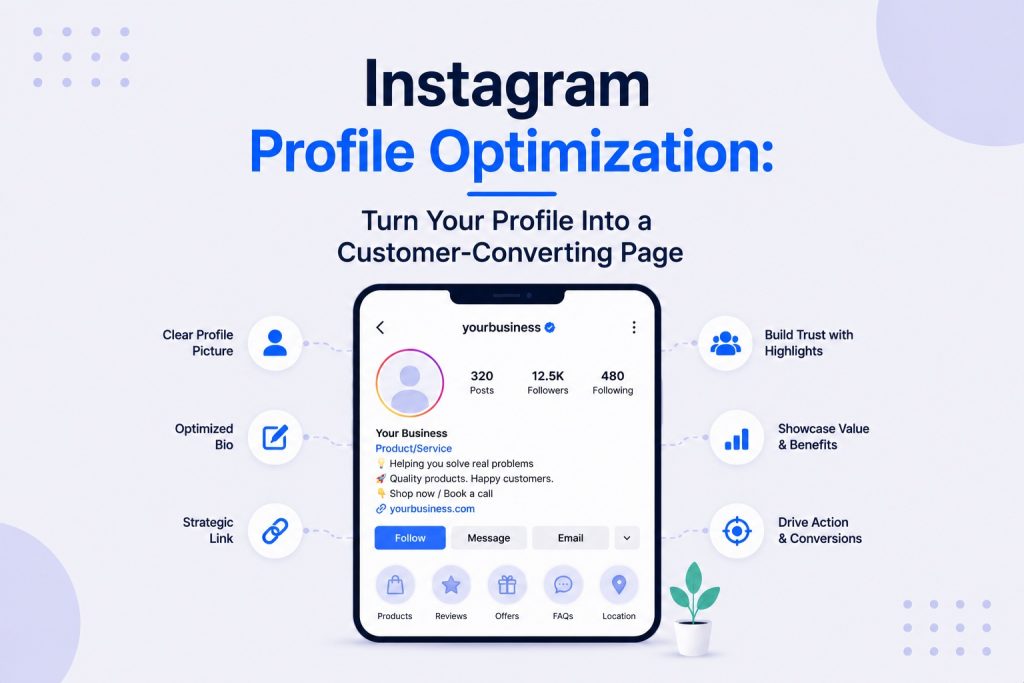
Your Instagram content brings people to your profile. Your profile is where they decide whether to stay.
Most small businesses spend all their energy on posts and almost none on the page those posts lead to. The result is consistent content that earns consistent interest and then fails to convert that interest into anything useful.
A fully optimized Instagram profile works like a landing page. It has seconds to answer four questions: who you are, what you do, who you do it for, and what to do next. If any of those four answers are unclear, the visitor moves on.
This guide covers every element of the Instagram profile and how to make each one do its job.
Why Your Instagram Profile Is a Landing Page
Every piece of content you publish is an entry point. Someone sees a Reel, clicks through to your profile, and makes a judgment call in under three seconds.
They are not reading carefully. They are scanning.
In those three seconds they register:
- Whether the profile photo looks professional or credible
- Whether the name and bio immediately communicate what the account is about
- Whether the pinned posts or Highlights look relevant to their situation
- Whether there is an obvious next step to take
This is exactly how someone evaluates a landing page. The parallels are direct. A landing page has a headline, a subheadline, proof elements, and a call to action. An Instagram profile has a bio, a name, Highlights, and a link. The mechanics are the same even if the format is different.
The difference is that most businesses obsess over landing page conversion and ignore profile conversion entirely.
Profile Photo: The First Impression That Sets Everything Else
The profile photo is the smallest element on the page and one of the most consequential.
It appears before someone reads a single word of the bio. It appears next to every comment you leave and every DM you send. It appears in search results, in followers’ Stories trays, and across the platform wherever the account’s name shows up.
For business brands:
- Use the logo, cropped and sized so it remains legible at the small circular display size Instagram uses
- Avoid complex logos with thin details that disappear when scaled down to a circle
- Test how the photo looks at thumbnail size before committing, not just in the full profile view
- Keep it consistent across every social platform to reinforce brand recognition
For personal brands and face-of-the-business accounts:
- Use a clear, well-lit headshot where the face is the dominant element, not a distant full-body shot
- Neutral or simple backgrounds keep the focus on the face rather than competing for attention
- Natural light produces the most approachable results for most small business contexts
- Update it if it is more than two or three years old, since a significantly outdated photo creates a disconnect when someone meets you in person or sees a recent Story
The most common mistake is using a group photo, an event photo, a product image, or a logo at too small a scale to be recognizable. Any of these fail the thumbnail test.
Username and Name Field: Clarity Over Cleverness
These two fields serve different purposes and get confused for the same thing.
Username (@handle):
- Keep it as close to the actual business name as possible
- If the ideal username is taken, add a simple qualifier like the city name or a relevant word, rather than random numbers
- Consistency across platforms matters: use the same username on Instagram, TikTok, LinkedIn, and Facebook wherever possible
- Short and readable beats clever and forgettable
Name field (the larger text below the profile photo):
- This is one of the two most searchable fields on the profile
- It should combine the business name with a keyword describing what the business does
- If the username already includes the business name clearly, the name field can go even more specific with location or specialty
- Keep it under 30 characters so it does not truncate in search results
For a full breakdown of how keyword choices in the name field affect search visibility both inside Instagram and on Google, the Instagram SEO guide covers this specific optimization in detail alongside alt text, captions, and hashtag strategy.
Bio Copywriting That Actually Converts
The bio has 150 characters. That is roughly two short sentences. Most businesses use it to describe themselves in generic terms that could belong to any competitor in the category.
A converting bio does not describe the business. It answers what the visitor wants to know: is this account for me and what do I get from following it?
The structure of a bio that converts:
Line 1: What you do and who you do it for
Line 2: Specific proof or differentiator
Line 3: What to do next (the call to action)
Examples across different business types:
Wedding photography:
“Candid wedding photography across the UK
800+ couples, fully booked each summer
Book a call via the link below”
Personal finance coach:
“Helping 9-to-5 workers build a second income
Without day trading or crypto schemes
Free starter guide in the link”
Home renovation contractor:
“Full home renovations in Edinburgh
15 years, 400+ projects
DM for a free quote”
Each of these answers who it is for, gives a specific reason to believe it, and tells the visitor what to do next. None of them waste characters on “passion-driven” or “here to inspire.”
What to avoid in a bio:
- Generic descriptors that apply to every business in the category (“dedicated,” “passionate,” “innovative”)
- Emoji-heavy formatting that obscures rather than clarifies the message
- A call to action that points nowhere specific (“DM us!” with no indication of what to DM about)
- Description of the business’s internal values rather than the visitor’s specific benefit from following
Line breaks and spacing:
Instagram bios display with line breaks, which most businesses either ignore or use randomly. Strategic line breaks create visual hierarchy, making each element of the bio easier to scan in that three-second window.
Link in Bio: Your Most Direct Revenue Tool
The link in bio is the only clickable link from the standard profile page. It is the most direct bridge between Instagram and any off-platform conversion action: a booking, a purchase, an email opt-in, or a lead form.
Most businesses either point it at their homepage and hope for the best, or forget to update it between campaigns.
Single link vs multi-link tools:
- For businesses with one primary conversion action, a single link directly to a booking page, product page, or lead form consistently outperforms a multi-link hub
- For businesses with multiple relevant destinations, tools like Linktree, Later’s link page, or a custom landing page allow multiple link options without losing the single-click advantage
- A well-designed multi-link page with 3 to 5 clear options converts better than one with 12 options, since choice paralysis reduces action
How to decide where to send people:
Ask one question: what is the single most valuable action a new follower could take right now?
- Service business: book a free consultation or get a quote
- E-commerce: shop the latest collection or a specific featured product
- Coach or consultant: download a free resource in exchange for an email address
- Local business: view the menu, book a table, or get directions
The bio’s call to action and the link should point to the same thing. A bio that says “Download the free guide” but links to the homepage homepage forces the visitor to do extra work that most will not bother with.
UTM tracking:
Add a UTM parameter to the link in bio so Google Analytics can accurately attribute website traffic, leads, and purchases to Instagram specifically. Without it, this traffic appears as “direct” in analytics with no Instagram attribution.
The format is simple: add ?utm_source=instagram&utm_medium=social to the end of any URL. This one step makes Instagram’s contribution to revenue measurable rather than invisible.
Story Highlights: Your Permanent Profile Portfolio
Regular Stories disappear after 24 hours. Highlights keep the best ones permanently visible on the profile.
Most businesses either use no Highlights at all, or create them randomly with no strategy behind the structure or content. The result is a row of Highlights a new visitor has no reason to tap through.
A strategic Highlights setup functions as a permanent portfolio and FAQ resource for anyone who lands on the profile.
Recommended Highlight categories for most small businesses:
- About / Our Story – Who you are, how you started, what makes you different
- Services / Products – What you offer and who it is for
- Results / Work – Before-and-afters, finished projects, client wins
- Reviews / Testimonials – Real customer feedback collected from DMs, reviews, and tags
- FAQs – Answers to the questions you get asked repeatedly before someone books or buys
- Process – What working with you actually looks like, step by step
The elements that make Highlights worth tapping:
- Custom cover images that match the brand aesthetic and use clear icons or text labels
- Covers that indicate the content inside rather than using random Story thumbnails
- No more than 8 to 10 Highlights, since too many signals disorder and most visitors will not watch more than the first few
- Regular updates so the content reflects current work and pricing, not last year’s
Naming:
Use short, clear names rather than abbreviations or emoji that require interpretation. “Reviews” is better than “⭐⭐⭐⭐⭐”. “FAQ” is better than “?”. The visitor should know what they are tapping before they tap it.
For specific tactics on using Highlights and interactive Story content to drive the kinds of engagement that support both community building and algorithmic distribution, this guide on Instagram engagement tactics covers the full Story engagement approach.
Pinned Posts: The First Content a New Visitor Sees
Instagram allows pinning up to three posts to the top of the profile grid. These become the first pieces of content a new visitor encounters when they scroll down from the bio.
Most businesses leave this entirely to chance, which means the pinned content is whatever happened to be posted recently regardless of whether it represents the account at its best.
What to pin and why:
- Pin the post that most clearly communicates what the account is about to someone who has never seen it before
- Pin the post that has generated the most profile visits, follows, or DM enquiries historically
- Pin a strong before-and-after or case study that demonstrates the business’s work immediately
- One of the three pins should ideally address the most common objection a new visitor might have (cost, process, trust)
What not to pin:
- Promotional or time-sensitive content that will feel outdated
- Generic content that does not show the business’s specific capability
- Content with low engagement that signals low quality to new visitors assessing credibility
Update pinned posts every one to two months so returning visitors see something fresh and new visitors always see the account’s current best work.
Visual Grid: The Aesthetic That Determines Whether People Stay
Before a new visitor reads anything, they see the grid. The arrangement of the last nine to twelve posts creates an immediate impression of quality and consistency.
This does not mean every post needs to look identical or use a rigid color template. It means the overall feel should be coherent, not chaotic.
What a strong visual grid communicates:
- Consistency of quality: every post looks like it was intentionally created, not an afterthought
- Visual identity: colors, filters, or style that are recognizably yours across the grid
- Content variety: a mix of formats and subjects that signals the account has range, not just one type of post repeated endlessly
Practical approaches to grid planning:
- Choose two or three core brand colors and ensure most content includes at least one of them
- Decide on one or two consistent visual treatments for text-heavy posts (font style, background color, layout) and apply them consistently
- Use Canva’s Instagram grid preview feature or Later’s visual planner to see how scheduled content will look before it publishes
- Avoid a perfectly symmetrical pattern grid unless your audience and category genuinely suit that aesthetic, since forced patterns can look artificial in most small business contexts
The grid does not need to be perfect. It needs to look intentional.
Profile Optimization by Business Type
The same profile elements mean different things for different business types. A product brand, a service business, and a personal brand have different conversion priorities and should optimize accordingly.
Product-based business:
- Profile photo: clean logo
- Bio line 1: what the product is and who it is for
- Bio line 2: what makes it specifically different from competitors
- Bio line 3: shop link with urgency or seasonal hook
- Highlights: new arrivals, bestsellers, reviews, sizing/FAQ, shipping
- Grid: product photos, lifestyle imagery, and UGC from customers
Service-based business:
- Profile photo: logo or owner headshot depending on whether the personal relationship drives conversion
- Bio line 1: the specific result or transformation the service produces
- Bio line 2: relevant credential, experience, or social proof number
- Bio line 3: book a call, get a quote, or DM us with a clear topic
- Highlights: services, results, process, reviews, FAQ
- Grid: before-and-afters, behind-the-scenes work, team content, testimonials
Personal brand and consultant:
- Profile photo: high-quality headshot, consistent across every platform
- Bio line 1: who you help and with what specific outcome
- Bio line 2: credibility proof (years of experience, media features, client number)
- Bio line 3: free resource, newsletter sign-up, or direct contact invitation
- Highlights: about me, client results, media appearances, resources, process
- Grid: educational content, personal story content, behind-the-scenes, client wins
Local business (restaurant, salon, gym):
- Name field: business name plus category plus city
- Bio line 1: what you offer and where you are located
- Bio line 2: hours or booking availability
- Bio line 3: reserve a table, book online, or call us
- Highlights: menu/services, team, atmosphere, reviews, events or promotions
- Grid: real photos from inside the business, product/service close-ups, community content
A strong profile foundation is what makes every growth tactic more effective. For a detailed look at how profile quality directly affects follower conversion from Reels, collaborations, and other discovery channels, this guide on Instagram growth strategy for small businesses shows why the profile is the make-or-break step in the growth loop.
How to Audit Your Own Profile
Run through this self-audit before assuming the profile is working.
The three-second test:
Ask someone who does not know your business to look at your profile for three seconds and then tell you what the business does and who it is for. If they cannot answer, the profile is not doing its job regardless of how well-written the bio is in isolation.
The conversion path test:
Click the link in bio and confirm:
- It loads on mobile without issues
- It points to the correct page for the current priority
- The page it lands on matches what the bio promised
- There is a clear next action on that page
The Highlights audit:
Tap through every Highlight as if you are a new visitor. Check whether each one adds genuine value, whether the content is current, and whether covers accurately represent what is inside.
The grid audit:
Look at the last nine posts as a block. If they feel inconsistent, identify whether the issue is visual quality, content mix, or both, since these have different fixes.
How to Measure Whether Your Profile Is Converting
A profile that looks good but does not convert is still a problem. Track these numbers to confirm the profile is doing its job.
- Profile visits to follows ratio – If profile visits are high but follow rate is low, the bio or Highlights are not giving visitors enough reason to stay
- Link in bio click rate – Available in Instagram Insights under the Profile Activity section; a low click rate with high profile visits suggests the call to action in the bio is unclear or not compelling
- DM volume from new followers – A well-optimized profile prompts new followers to reach out immediately, since the bio and Highlights answered their initial questions and created enough trust to ask about the next step
- Profile visit source breakdown – Instagram Insights shows what drove profile visits (specific posts, Reels, Stories, or Search), which reveals which content types are most effectively routing people to the profile
For a complete framework covering these profile metrics alongside the broader set of KPIs that matter for business growth on Instagram, this guide on important social media KPIs to track for small businesses covers what each number means and what action to take when it is weak.
Common Instagram Profile Optimization Mistakes
These are the habits that consistently leave conversion on the table even when the content itself is strong.
- Using only the business name in the name field – Misses the searchability and immediate clarity that a combined keyword gives
- Bio that describes the business internally rather than communicating what the visitor receives
- Link in bio pointing to the homepage rather than a specific, relevant conversion page
- No Highlights, or Highlights with confusing or unnamed covers that give visitors no reason to tap
- Random pinned posts that do not represent the account’s best or most relevant content
- A profile photo that is illegible at thumbnail size due to complexity or distance
- No clear call to action anywhere on the profile, leaving visitors with nothing to do next
- A private account for a business profile, which blocks search discovery and limits reach across every surface
Want Your Profile Set Up and Optimized for You?
An optimized profile is the foundation every other Instagram strategy depends on. Without it, even the best content fails to convert the interest it earns.
Our social media marketing services include full profile setup and optimization as part of the content and strategy work we build for small businesses, so the foundation is right from the start.
The Bottom Line
Every piece of Instagram content is an entry point. The profile is what turns that entry into a decision.
A strong profile photo that builds recognition. A bio that answers who you are and what to do next in 150 characters. A link that goes somewhere specific and useful. Highlights that tell the full story for someone who wants more. Pinned posts that show the account at its best.
None of these elements are complicated. All of them matter more than most businesses realize, and all of them can be improved in an afternoon.
Frequently Asked Questions:
1. What should an optimized Instagram profile include for a small business?
A fully optimized Instagram profile includes a legible profile photo, a username consistent with other platforms, a name field that combines the business name with a relevant keyword, a bio that states clearly what the business does, who it serves, and what to do next, a link in bio pointing to a specific conversion page, Story Highlights organized around services, results, reviews, FAQs, and process, up to three pinned posts representing the account’s best or most relevant content, and a visually coherent grid.
2. What is the most important element of an Instagram profile to optimize first?
The bio has the highest immediate impact for most businesses since it is the primary element a new visitor reads when deciding whether to follow or contact the business. A bio that fails to communicate what the business does, who it is for, and what to do next causes most visitors to leave regardless of how strong the content or Highlights are. After the bio, the link in bio and name field should be prioritized since these affect both conversion and search discoverability.
3. How do you write an Instagram bio that converts visitors into followers?
Structure the bio across three lines: the first stating what you do and who you do it for, the second providing a specific proof point or differentiator, and the third giving a clear call to action. Avoid generic descriptors that could apply to any business. Use the visitor’s language rather than internal brand language. Every word should serve the question the visitor is silently asking: is this account worth following and what do I get from it?
4. How should small businesses use the Instagram name field?
The name field should combine the business name with a keyword that describes what the business does, since this field is directly searchable within Instagram. A restaurant in Austin might use “Maple Street Kitchen | Brunch Cafe Austin” rather than just “Maple Street Kitchen,” since the first version appears in searches for “brunch cafe Austin” while the second does not. Keeping the field under 30 characters prevents it from truncating in search results.
5. What is the best link in bio strategy for a small business?
Point the link at the single most valuable action a new follower could take given the current business priority: a booking page, a lead form, a specific product, or a free resource. For businesses needing multiple link destinations, a simple link page with 3 to 5 clearly labeled options outperforms a homepage or a link page with too many choices. Always add UTM parameters to the link so Google Analytics can attribute traffic, leads, and revenue to Instagram accurately rather than lumping it into “direct” traffic.
6. What should Instagram Story Highlights include for a small business?
Effective Highlights for most small businesses cover: an About or Our Story section, a Services or Products section, a Results or Work portfolio, a Reviews or Testimonials collection, a FAQ section addressing pre-purchase objections, and a Process section showing what working with the business looks like. Each Highlight should have a custom cover image with a clear label, and the total number should stay between 5 and 8 to avoid overwhelming new visitors with too many options to explore.
7. How do pinned posts help with Instagram profile optimization?
Pinned posts control the first impression a new visitor gets when they scroll down from the bio. Rather than leaving this to chance, pinning the three most representative or highest-performing posts ensures every new profile visitor immediately sees the account’s best work, strongest social proof, or clearest explanation of what the business does. Update pinned posts every one to two months so they reflect current work rather than outdated campaigns.
8. How does the visual grid affect whether people follow an Instagram account?
The grid creates an immediate visual impression before anyone reads a caption or bio. A coherent, consistent grid signals quality and intentionality, which builds credibility with a new visitor scanning the profile. A chaotic or inconsistent grid raises doubts about the professionalism of the underlying business. The grid does not need to follow a rigid pattern, but it should reflect consistent visual quality, a recognizable color palette, and a coherent mix of content types that makes sense together.
9. How do you measure whether your Instagram profile is optimized effectively?
Track the profile visits to follows conversion ratio in Instagram Insights, which shows what percentage of profile visitors choose to follow after seeing the profile. Also monitor the link in bio click rate to confirm the call to action is working, and DM volume from new followers to gauge whether the profile is creating enough trust for people to reach out immediately. A high profile visit count paired with low follow or click rates points to a specific profile element failing, usually the bio or the link destination.
10. Does profile optimization differ for product businesses versus service businesses?
Yes, meaningfully. Product businesses should prioritize a clean logo, a bio that describes the product and its specific benefit, a link directly to the shop or a featured product, and Highlights covering new arrivals, bestsellers, reviews, and shipping. Service businesses benefit more from a headshot (if the relationship with the owner drives conversion), a bio focused on the specific result or transformation the service produces, Highlights focused on before-and-after results and the process, and a link pointing to a booking or consultation page.